Gobel
October 12, 2026
Why we built it
The tools we used to take a screenshot and quickly add an arrow or text on top of it were either overly bloated or consumed unnecessary resources in the background. We wanted a simple, lightweight alternative that runs from the system tray — when we couldn't find one, we built it ourselves.
What is Gobel
A lightweight screenshot and annotation tool for Windows — similar to Greenshot, but with fewer features and a much smaller footprint.
What it offers
3 global shortcuts — PrintScreen: all screens, Alt+PrintScreen: active window, Shift+PrintScreen: free-area selection (shortcuts can be changed in Preferences; if one conflicts, the others keep working).
Quick menu after capture — edit, save directly, or copy to clipboard.
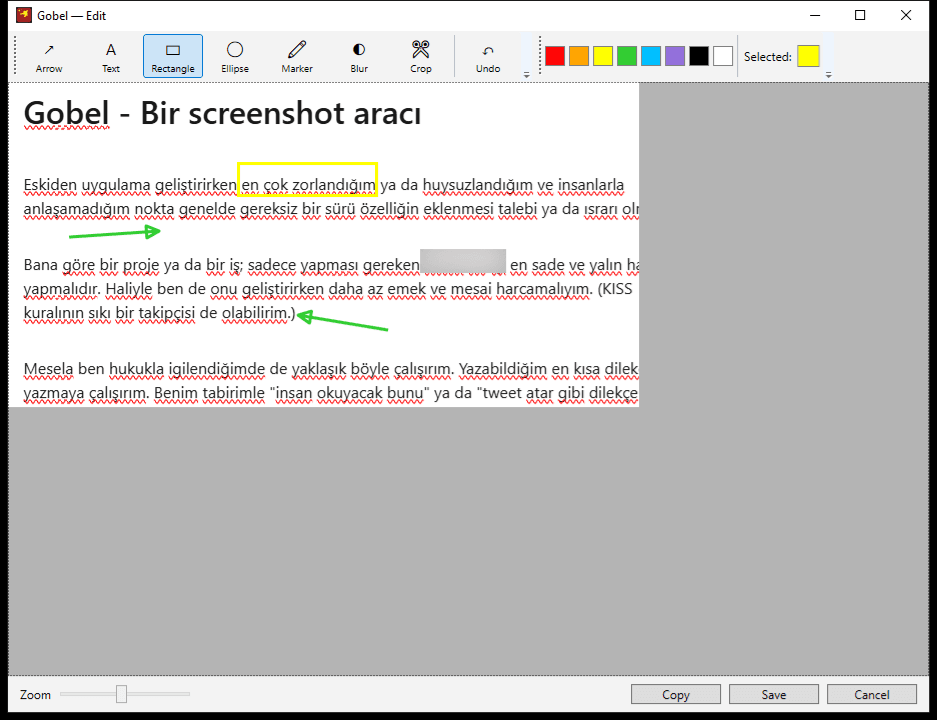
Full-featured editor — arrow, text, rectangle, ellipse, highlighter, blur, crop, color palette, undo, zoom.
Auto-start on Windows boot, runs quietly from the system tray.
Configurable preferences — save folder, file name pattern, format (PNG/JPEG/BMP), JPEG quality, show in Explorer after saving.
How we built it: technical architecture
Built with WPF on C# 12 and .NET 8. Screen capture is based on System.Drawing; blurring and image encoding/decoding use SkiaSharp. Global shortcuts are registered directly via Win32 P/Invoke (RegisterHotKey); since each shortcut is registered independently, if one conflicts (e.g. with another application), the others keep working. Distribution is a single-file, self-contained release package.
Who it's for
Anyone who wants to quickly take and share screenshots without needing heavy, cloud-dependent tools.
To use it
https://anatolianorganics.com.tr/gobel/gobel-1.0.1.zip
Conclusion
Gobel is another example of our habit of solving a small everyday problem with our own tool. The source code is open on GitHub. If you have a similar desktop tool need, get in touch; you can see our other work under our software development service.